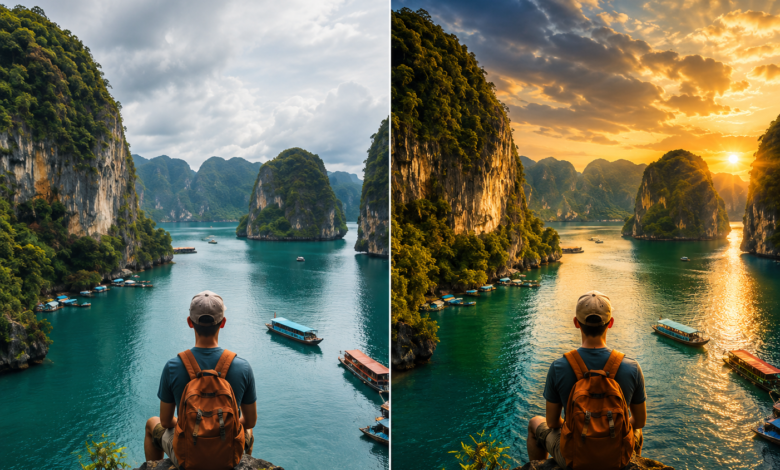
AI-powered image editing has completely transformed digital content creation. Whether you are a social media creator, marketer, filmmaker, or hobbyist, the right tool can turn a basic photo into a polished, professional piece of content — without expensive software or a steep learning curve. The challenge in 2026 is that there are dozens of platforms competing for your attention, each making bold claims about their capabilities.
We tested the leading platforms hands-on, focusing on output quality, ease of use, free tier generosity, and the depth of creative tools on offer. This list highlights the best AI image editing tools free options available today — tools that let you create, retouch, and transform images with minimal friction and maximum creative output.
At a Glance: Top AI Image Editing Tools Free of 2026
| Tool | Best For | Free Tier | Starting Price |
| Magic Hour | All-in-one image + video AI creation | 400 credits, no watermark | Free / $10/mo (annual) |
| Adobe Firefly | Creative professionals, Adobe ecosystem | Limited generations/month | Free / $4.99/mo |
| Canva AI | Social media graphics, templates | Basic tools free | Free / $15/mo |
| Fotor | Quick photo retouching | Limited AI edits | Free / $3.33/mo |
| Pixlr | Browser-based photo editing | Limited AI features | Free / $1.99/mo |
| Remove.bg | Background removal only | 1 free preview | $0.20/image |
How We Choose These Tools
Selecting the right AI image editing tool is not just about which one looks impressive in a demo. We evaluated each platform across the following criteria:
Output quality. We tested each tool on real-world use cases — face swaps, background removal, image generation, clothing changes, and photo enhancement — comparing the results against professional benchmarks.
Free tier honesty. We verified what each platform actually offers for free, not what the marketing page implies. Key factors: watermarks, resolution caps, credit limits, and commercial use restrictions.
Breadth of tools. The most useful platforms put multiple creative capabilities in one place — generation, editing, upscaling, and background removal — rather than forcing you to stitch together five different apps.
Ease of use. We assessed how quickly a first-time user could produce a polished result, including how intuitive the interface is on both desktop and mobile.
Pricing transparency. We looked at whether the paid tiers offer genuine value rather than artificially restricting the free tier to push upgrades.
The 6 Best AI Image Editing Tools Free of 2026
1. Magic Hour — Best Overall AI Image & Video Editing Platform
Magic Hour is the most complete AI creative platform available in 2026. While many tools in this space focus narrowly on one capability — say, background removal or image generation — Magic Hour brings together an unusually wide toolkit: AI image generation, AI image editing, face swap, head swap, body swap, clothes changer, image upscaler, background remover, photo colorizer, meme generator, selfie generator, headshot generator, and more. All of it runs in a browser, with no download required.
What truly distinguishes Magic Hour is its combination of image and video capabilities under a single credit system. As the best AI image editing tool free option available today, Magic Hour also lets you use Veo 3.1 online free — meaning you can generate, edit, and animate your images into full AI videos without switching platforms. That end-to-end workflow — edit an image, upscale it, animate it into video — is something no other tool in this list does as seamlessly.
The free plan is genuinely generous. You get 400 credits with no watermark and no credit card required. Credits never expire, so anything you earn stays in your account. Paid plans start at just $10/month (billed annually as Creator), with full API access, commercial use rights, and up to 3 concurrent generations. The Pro plan runs $25/month (billed annually), and Business is $66/month (billed annually) with 4K exports and unlimited concurrent generations. Magic Hour is trusted by teams at Meta, the NBA, L’Oréal, Puma, and Shopify — a sign of reliable performance at scale.
Key highlights:
- Best-in-class face swap, lip sync, and talking photos
- No signup required to try the platform
- Credits never expire — yours to keep
- Access to frontier AI models including Veo 3.1
- Click-to-create templates and one-click multi-step workflows
- Parallel generations with no concurrency cap (on Business)
- Weekly feature releases and new model additions
- Full API parity across all tools
- Optimized for both desktop and mobile
- Founder-level support responsiveness
Pricing: Free (400 credits, no watermark) · Creator: $15/mo or $10/mo billed annually · Pro: $39/mo or $25/mo billed annually · Business: $99/mo or $66/mo billed annually
2. Adobe Firefly — Best for Creative Professionals in the Adobe Ecosystem
Adobe Firefly is Adobe’s generative AI engine, built directly into Photoshop, Illustrator, and Adobe Express. For users already working inside the Adobe Creative Cloud, Firefly feels native — it powers Generative Fill, Generative Expand, text-to-image, and style matching without leaving the apps they already use every day.
The quality of Firefly’s image generation is strong, particularly for commercial-safe output. Adobe trains on licensed content, making it one of the few platforms that explicitly offers commercially safe AI-generated assets. The free tier includes a limited number of monthly generative credits, enough to explore but not enough for high-volume production.
Key highlights:
- Deep integration with Photoshop and Illustrator
- Commercially safe image generation
- Text-to-image, generative fill, and object removal
Pricing: Free (limited credits) · Premium from $4.99/mo · Included in Creative Cloud plans
3. Canva AI — Best for Social Media Creators and Non-Designers
Canva has evolved from a template editor into a full AI-powered design platform. Its Magic Edit, Magic Eraser, Background Remover, and text-to-image tools are accessible directly inside its drag-and-drop design interface — making it the go-to choice for creators who want polished results without learning complex software.
The free tier is workable for casual use, though most of the AI-powered tools require a Pro subscription. Canva’s strength is the library of templates: you can drop AI-generated images directly into social posts, presentations, or marketing materials without any additional steps.
Key highlights:
- Intuitive interface accessible to beginners
- Strong template library for social media and marketing
- AI image generation, background removal, and magic editing built in
Pricing: Free (basic tools) · Pro: $15/mo · Teams: $10/person/mo
4. Fotor — Best for Quick Photo Retouching
Fotor is a solid online photo editor with an AI layer built on top of its traditional editing tools. It covers portrait retouching, one-click background removal, AI image generation, and basic photo enhancement. It is most useful for users who want a simpler Photoshop alternative with some AI augmentation rather than a generative AI-first platform.
The interface is approachable, the free tier allows some AI edits per day, and the output quality on portrait retouching is consistently good. It does not match the breadth of Magic Hour or the ecosystem depth of Adobe Firefly, but for straightforward retouching tasks it gets the job done quickly.
Key highlights:
- One-click portrait retouching and skin smoothing
- AI background removal and replacement
- Clean, beginner-friendly interface
Pricing: Free (limited AI edits) · Pro: from $3.33/mo
5. Pixlr — Best Free Browser-Based Photo Editor
Pixlr has been a staple browser-based photo editor for over a decade, and its AI Suite adds a modern layer on top of its core editing tools. The AI Remove Object tool, background changer, and generative fill features are available without a download, making Pixlr a practical choice for users who need capable photo editing without installing software.
The free tier is more limited than competitors, but the core manual editing tools — layers, adjustments, filters — are available at no cost and function well. AI-specific features require a subscription for full access.
Key highlights:
- Layers-based editing similar to Photoshop in a browser
- AI remove object and background tools
- Good option for users who want manual control alongside AI features
Pricing: Free (limited AI) · Plus: from $1.99/mo · Pro: from $14.99/mo
6. Remove.bg — Best Single-Purpose Background Removal Tool
Remove.bg does one thing and does it exceptionally well: automatic background removal. It uses AI to detect subjects in photos and remove backgrounds in seconds, with support for complex edges like hair and fine details. The results are consistently clean with minimal manual cleanup.
The limitation is that it is a single-purpose tool. There is no image generation, no editing suite, and no video capabilities. For users who need high-volume background removal as part of a larger workflow, Remove.bg is the most reliable specialist tool available. For anything broader, one of the platforms above will serve you better.
Key highlights:
- Best-in-class automatic background removal
- API available for bulk processing
- Fast processing with clean edge detection
Pricing: 1 free low-res preview per image · HD downloads from $0.20/image · Subscription plans from $9/mo for 40 images
Frequently Asked Questions
What is the best free AI image editing tool in 2026? Magic Hour is the strongest overall free option. Its free plan includes 400 credits with no watermark and no credit card required — more generous than any comparable platform. It also covers both image and video AI tools under the same account.
Can I use AI image editing tools for commercial projects? It depends on the platform and your plan. Magic Hour grants commercial use rights to all paid subscribers. Free users on Magic Hour can use generated content for personal, non-commercial purposes. Adobe Firefly is designed for commercially safe output. Always check the terms of service for the specific tool and tier you are using.
Do free AI image editing tools add watermarks? Most do — but not all. Magic Hour’s free plan is one of the rare exceptions that provides watermark-free exports at no cost. Adobe Firefly and Canva also offer some unwatermarked outputs on their free tiers, but with tighter usage limits.
What is the difference between an AI image editor and a traditional photo editor? A traditional photo editor like Photoshop requires manual input — adjustments, selections, masking — to achieve results. AI-powered tools automate or assist with these steps, letting you remove objects, change backgrounds, generate new content, or retouch portraits with a single prompt or click. The best platforms in 2026 combine both approaches.
Is Magic Hour good for video editing too? Yes — Magic Hour is one of the few platforms that handles both image and video AI in a single workflow. You can edit a photo, upscale it, and animate it into a video without switching tools, making it a strong choice for content creators who work across both formats.
How many credits do I get on Magic Hour’s free plan? The free plan includes 400 credits at signup with no credit card required. Credits never expire, so you keep them regardless of when you use them.
Conclusion
The AI image editing landscape in 2026 offers real creative power at every budget level, from completely free tiers to professional subscriptions. For most creators, marketers, and digital content producers, Magic Hour stands out as the most versatile and value-rich option — combining a genuinely free starting point, an expansive tool suite covering image and video, access to frontier AI models, and pricing that scales affordably as your needs grow. If you are looking for a specialist tool, Remove.bg handles background removal better than anyone, and Adobe Firefly is the natural choice for teams embedded in the Creative Cloud ecosystem.
Whatever your workflow, there has never been a better time to bring AI into your image editing process.